
Does Apple Podcasts Have Video? Full 2026 Guide

Yes, Apple Podcasts supports video through two delivery paths, standard RSS feeds using MOV, MP4, and M4V files and Apple's newer HLS experience announced February 16, 2026. Availability depends on the show, host support, device, OS version, and region, so having the app doesn't guarantee you'll see video for every title.
You're probably asking because a show looks audio-only on your phone, a client wants video on Apple, or your host just sent a confusing update. That's the normal state of things right now. Apple runs two systems in parallel, and most quick answers collapse them into one workflow that doesn't match your setup.
Table of Contents
The Short Answer for Listeners and Creators - Two Paths Not One
How Video Works Inside Apple Podcasts - What HLS Changes on the Show Page - Why Availability Still Varies
The Listener Experience Across Devices - Where Video Works First - Where Audio Keeps Working
HLS Video vs Standard RSS Video - Side by Side Comparison - Analytics and Distribution Implications
Choosing the Right Path as a Creator - A Simple Decision Tree
The Short Answer for Listeners and Creators
If you're a listener, the question does Apple Podcasts have video really means will this episode play as video on your device today. Sometimes yes, sometimes no. The show has to publish video, your host and region have to support it, and your OS has to be current enough.
If you're a creator, you're asking a different question. You want to know if you can publish video to Apple without breaking your existing audio feed, losing followers, or migrating hosts. The answer depends on which delivery path your host supports.
Two Paths Not One
Apple supports standard RSS video and a newer HLS video experience. RSS is the older route, where a hosting feed carries video files. HLS, or HTTP Live Streaming, is Apple's preferred route and puts audio and video together on one show page.
Apple announced its HLS-based video podcast experience on February 16, 2026, with beta testing in iOS 26.4, iPadOS 26.4, and visionOS 26.4, and broader availability planned for iPhone, iPad, Apple Vision Pro, and the web, according to Apple's February 2026 newsroom announcement. That date matters. HLS video is a recent platform milestone, not a long-standing universal feature every show already has.
For listeners: Look for video on the show page, but don't assume a missing video means you did something wrong.
For creators: Don't assume your current host can deliver HLS just because it delivers your audio RSS feed today.
For brands and agencies: Confirm eligibility market by market before you promise Apple video in a launch plan.
Ask which delivery model is available for your show, in your market, with your current host. That's the useful version of the question.
Treat Apple as a real video channel, but a conditional one. Your next step isn't uploading a file. It's identifying whether you're on the RSS path, the HLS path, or neither yet.
How Video Works Inside Apple Podcasts
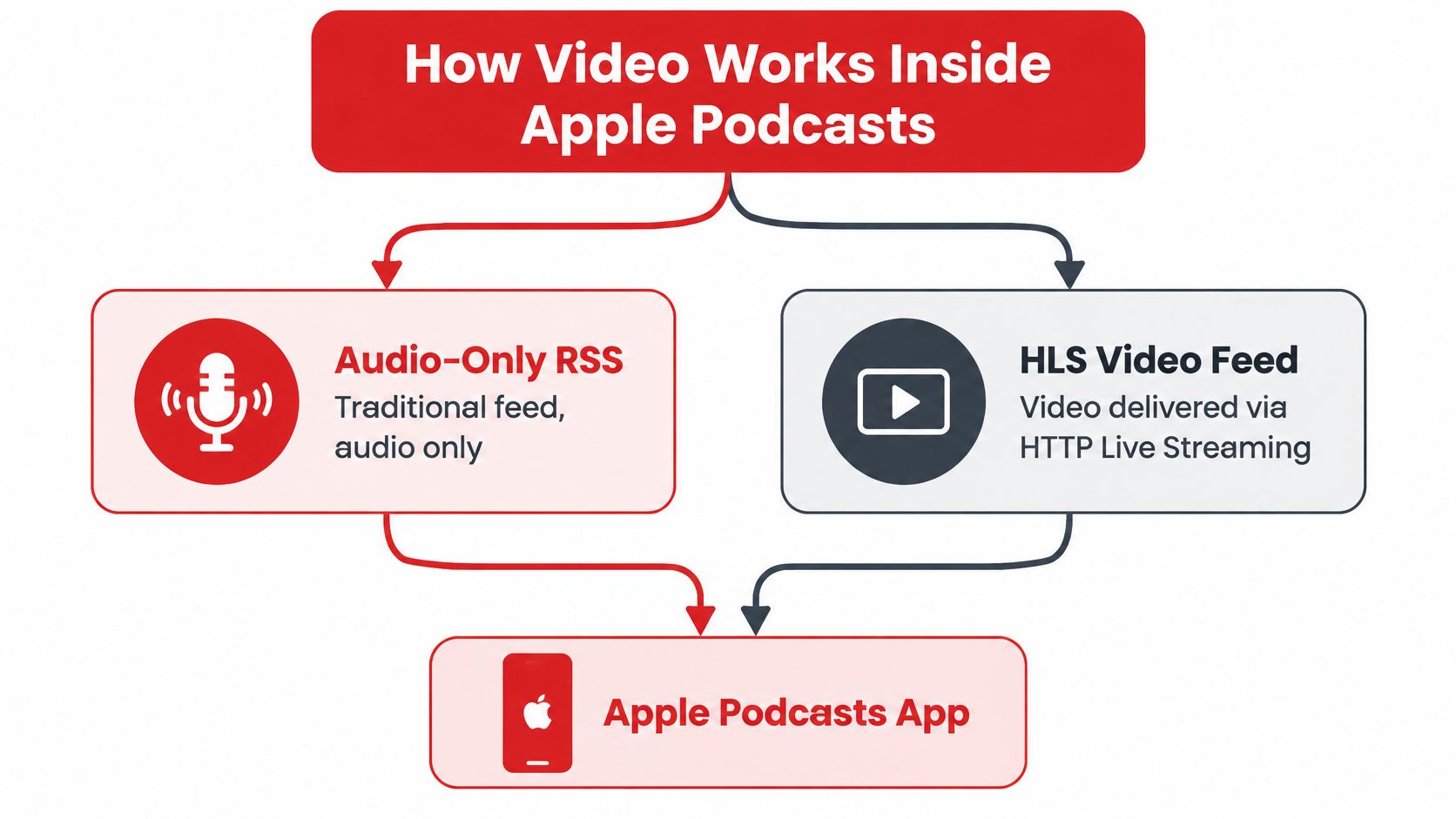
Think of RSS video as attaching a video file to a feed. Your hosting provider publishes the feed, Apple Podcasts reads it, and compatible devices play the video. It's straightforward, and it's been available through many hosts for years.
HLS works differently. Instead of treating video as a separate file in a feed, Apple streams it in a way that lets the app move between audio and video inside the same episode. You press play once and choose how you want to experience it.
The flow below shows how those two delivery routes reach the same app.
What HLS Changes on the Show Page
Apple's HLS experience combines audio and video on one show page. Listeners can watch video, switch to audio-only playback, return to video, use horizontal full-screen viewing, and download videos for offline viewing, as described in Apple's video podcasts support documentation.
Apple designed that switching for a specific habit. You start listening while traveling, then you sit down at home and resume with video. It's the same episode and the same show, not a hunt for a separate video version.
Why Availability Still Varies
Video availability depends on the show, device, operating-system version, and region. A show can publish video and a listener in one market still won't see it. Another listener on an older OS also won't see it.
The show: The creator has to publish a video version in the first place.
The device and OS: HLS needs supported hardware and software, audio doesn't face the same bar.
The region: Apple notes HLS availability may vary by country or region.
The host: Delivery runs through hosting providers, not direct uploads to Apple.
Practical rule: If you can't explain whether a show uses RSS video or HLS video, you can't troubleshoot why video isn't showing up.
That distinction explains most confusion. Two shows can both claim video on Apple and deliver completely different experiences to the same listener.
The Listener Experience Across Devices
On a supported iPhone or iPad, HLS video feels like a podcast that opens up. You tap play, you watch, then you lock your phone or switch to audio and keep going. When you come back, you return to video without starting over.
Horizontal full-screen viewing is part of that experience, and so are offline downloads. You can download a video episode before a flight the same way you'd download audio. That makes Apple video usable for commuters, not just people sitting at a desk.
Where Video Works First
Apple initially targeted iPhone, iPad, Apple Vision Pro, and the web for the HLS rollout. Those are the surfaces where the switching experience is designed to work. If you're testing whether a show has HLS video, test there first, on a current OS.
Don't test on a watch and conclude video is broken. A small, audio-first surface tells you nothing about the HLS experience. Start with the phone in your pocket.
Where Audio Keeps Working
Apple says RSS-followed shows can play across iPhone, iPad, Mac, Apple Watch, Apple TV, CarPlay, HomePod, Windows iTunes, and Alexa devices, as covered in the section above on distribution. That broad list describes podcast playback, not identical video playback everywhere.
Teams misread the documentation here. They see a long device list and assume every device plays video the same way. It doesn't work like that.
CarPlay and Apple Watch: Expect an audio-first experience, you're driving or glancing at a wrist.
HomePod and Alexa devices: You're listening through a speaker, so audio is the product.
iPhone, iPad, Vision Pro, web: These are the screens built for watching and switching.
Before you buy a subscription for video or report a missing episode, check your device, your OS, and your region. Most "missing video" problems are eligibility problems, not broken feeds. Check the show page on a supported screen first.
HLS Video vs Standard RSS Video
Creators don't choose between video and no video. You choose between two publishing systems with different gatekeepers. Picking the wrong one wastes a migration or locks you into a separate feed you didn't need.
Standard RSS video is the flexible older route. You publish video files through a self-hosted or third-party feed, and you can run video as a separate show or dedicated feed alongside your audio podcast. That separation protects your audio feed, but it also splits your presence.
HLS is the integrated newer route. Apple says HLS video can preserve existing followers and downloads because it lives on the same show. In exchange, you need host support, an Apple Podcasts Connect API key, show approval, and regional eligibility.
Side by Side Comparison
Dimension | HLS Video | Standard RSS Video |
|---|---|---|
Show page | Audio and video combined on one page | Often a separate show or dedicated feed |
Host requirement | Participating HLS host required | Many hosting providers support it |
Approval | API key, show approval, regional eligibility | Publish through your feed |
File formats | Delivered as HLS streams via host | MOV, MP4, and M4V |
Listener switching | Watch, switch to audio, return to video | No integrated switching promise |
Followers | Designed to preserve existing followers | Separate feed means separate following |
Offline | Download video for offline viewing | Depends on feed and device |
Best fit | Shows on a launch host in eligible markets | Shows needing video today without migrating |
At launch, Apple identified Acast, ART19, Omny Studio, and SiriusXM, including SiriusXM Media, AdsWizz, and Simplecast, as supporting HLS video, with additional providers expected to join. If you're not on a participating host, HLS isn't a settings toggle. It's a platform decision.
Analytics and Distribution Implications
Apple groups video and audio consumption under overall show metrics in Analytics. You don't get completely separate show-level totals for the two formats. Plan your reporting around that rollup before a client asks for a clean video-only number you can't produce.
That rollup is honest about behavior. One listener watches half an episode and listens to the rest, and Apple counts that person at show level. Your internal dashboard should reflect the same logic.
If you're mapping this against your wider release plan, read a practical guide to podcast distribution across platforms before you commit to a feed structure. Feed decisions are cheap to make and expensive to unwind. Make them once, on purpose.
Don't migrate hosts for HLS until you've confirmed approval and regional eligibility. A new host doesn't fix an ineligible market.
Choosing the Right Path as a Creator
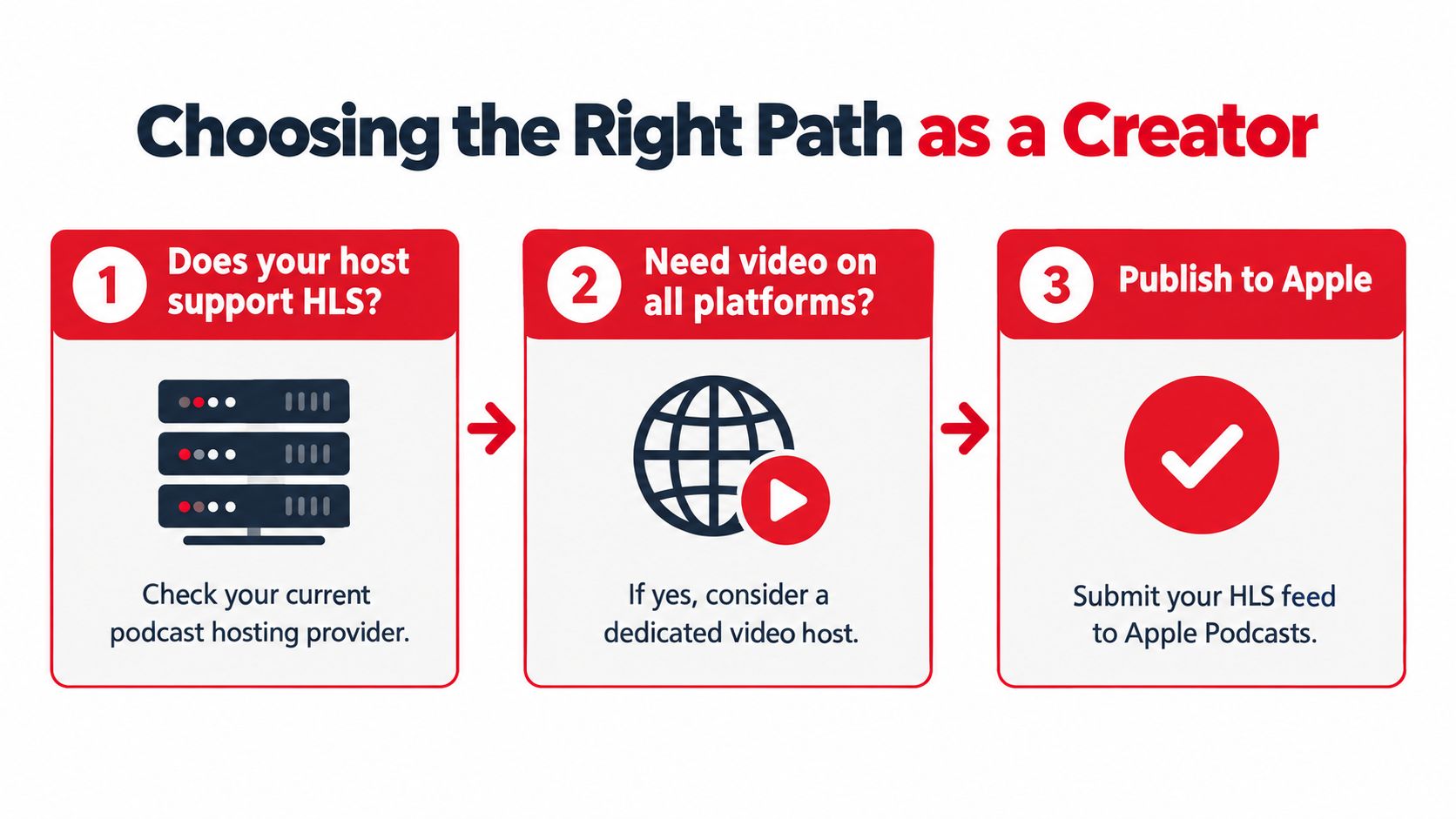
Start with your host, not your camera. Ask your hosting provider one direct question, do you support HLS video for Apple Podcasts today, for my show, in my markets. Get the answer in writing before you produce anything.
The decision flow below puts that host check first, where it belongs.
A Simple Decision Tree
Your host supports HLS and your market is eligible: Go HLS. You get one show page, switching, and continuity for followers.
Your host doesn't support HLS yet: Use RSS video if you need video on Apple now, and keep your audio feed unchanged.
Your market isn't HLS eligible: Don't force it. Publish audio on Apple and put full video where your audience can watch it.
You're launching a new show: Choose the host based on the Apple path you want, not after you've recorded a season.
Apple's standard RSS option allows creators to publish video through a self-hosted or third-party feed with MOV, MP4, and M4V files, and to distribute video as a separate show or dedicated feed alongside audio, per Apple's guide to publishing video podcasts. Use that separation deliberately. A dedicated video feed is a real product decision, not a technical accident.
For production planning, work through what end-to-end video podcast production actually involves alongside these B2B podcast production tips before you set a shooting schedule. B2B shows especially need the recording, editing, and approval workflow settled before feed choices, because a guest-heavy format creates different bottlenecks than a solo show.
Keep your existing audio feed stable while you test. Your current followers are an asset, and a sloppy feed change is the fastest way to lose them. Add video around a working audio operation, don't rebuild the operation around unconfirmed video eligibility.
Should Apple Be Your Video Channel or Just an Audio One
Full video costs money on every episode. Cameras, sets, editing, captions, and extra review cycles don't care which platform the file lands on. So the question is where that footage earns its keep.
The production effort behind a proper video episode looks like this, not like pressing record on a call.

My recommendation for most brands is direct. Treat Apple as audio-first with video when HLS is confirmed, put full video discovery effort into YouTube, and cut clips for social. YouTube and social platforms are built for visual discovery by people who've never heard of you, while Apple serves people who already follow the show.
That calculus changes if your audience lives inside Apple and your host supports HLS. Then the switching experience keeps existing followers inside one show instead of sending them elsewhere. Read a head-to-head comparison of video podcasts and audio podcasts if your team is still debating whether to shoot at all.
The clip below is useful context on how production choices shape what a video episode can do across channels.
Monetization is the reason not to ignore Apple video entirely. Apple has announced plans for subscriber-exclusive video, ad-free video, early access, and bonus content in more than 170 countries and regions, according to Apple's documentation on how it distributes shows to listeners. That's a premium video business forming inside Apple, beyond ordinary episode distribution.
Don't build your whole budget around features still rolling out. Do keep your production files and rights in order so you can supply premium video when your host and market support it. Shooting clean, well-lit video now gives you optionality later, even if Apple stays audio-first for your show this quarter.
What to Confirm Before You Publish Video on Apple
Don't publish until you've confirmed every item below with a named person at your host. Assumptions are how launches slip. This checklist is the whole job before episode one goes live.
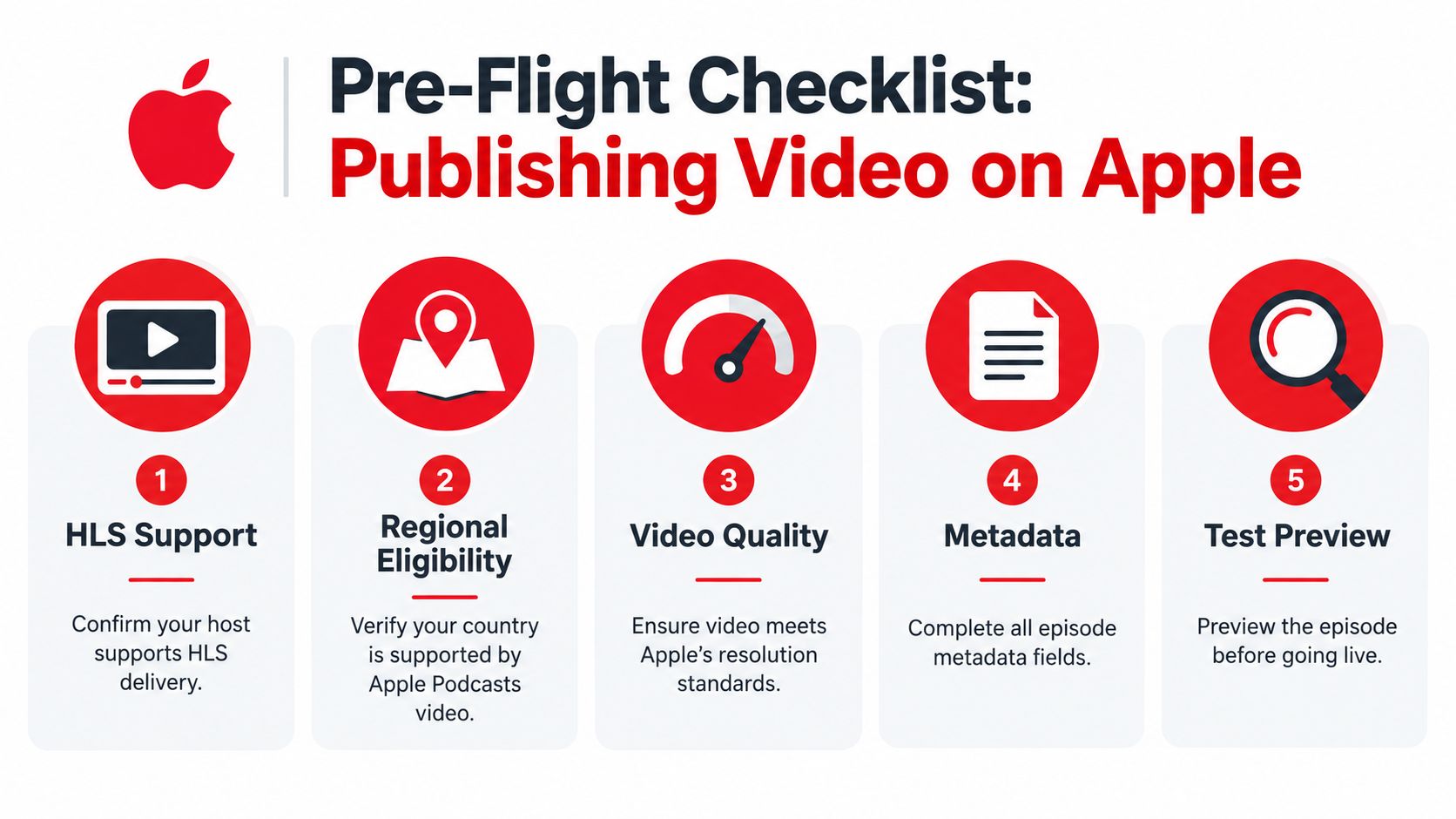
HLS support: Confirm your current host supports HLS delivery, not just RSS video.
Regional eligibility: Verify every target market, not just your home country.
API key and approval: Confirm your Apple Podcasts Connect API key and show approval status for HLS.
Audio feed continuity: Decide in writing whether the audio feed stays unchanged, and whether video runs as a dedicated feed or separate show under RSS.
File preparation: For RSS, prepare MOV, MP4, or M4V files and test one episode end to end.
Analytics expectations: Tell stakeholders now that Apple rolls video and audio into overall show metrics.
Device testing: Preview on iPhone, iPad, and the web before you announce anything.
Ask your host what happens to followers, downloads, and ad insertion when video is enabled. If they can't answer clearly, you're not ready to launch. Video on Apple Podcasts is real, but only when your host, your market, and your format line up at the same time.
If you're deciding between RSS and HLS, planning a host move, or building a video workflow that works across Apple, Spotify, and YouTube, Podmuse can produce and distribute your show end to end and tell you plainly which Apple path your setup qualifies for. Visit Podmuse to talk through your feed, your markets, and your launch timeline before you record another episode.


Comments