
How to Master Podcast Audio: A Step-by-Step Workflow

You've finished editing an episode, and it sounds balanced through your studio headphones. Then you play the export on your phone: the guest disappears under the music, the intro feels too loud, and an ad arrives with a jolt. Turning up the master won't fix those differences.
Learning how to master podcast audio means building a repeatable chain, then judging the file listeners receive. The work starts before recording and ends after encoding, with a listening check that matters more than an impressive waveform.
Table of Contents
The Podcast Audio Workflow in Order - Where each stage gets resolved
Set Up Your Room and Mic Before Recording - Choose the space by listening - Establish repeatable microphone technique
How to Clean and Edit Speech Step by Step - Edit for continuity - Use automation as an assistant
EQ and Compression Settings for Speech - Correct tone before controlling dynamics - Compress delivery, not personality
Loudness Targets and How to Measure Them - Measure the entire programme - Separate balance from final level
Export Settings and a Final Listening Check - Inspect the encoded file - Give each device a specific job
Check Accessibility for Music, Stingers and Ads - Preserve meaning across formats
Decide Whether to Master In-House or Outsource - Define the handoff before delegating
The Podcast Audio Workflow in Order
Stage | Goal | Pass check before moving on |
|---|---|---|
Room and mic | Cut reflections and place the mic correctly | Clap test shows no flutter echo |
Recording levels | Keep peaks clean before processing | Loud speech stays below clipping |
Noise and silence cleanup | Remove hiss, clicks and dead air | Room tone is reduced without a watery sound |
Speech balancing | Match each speaker's loudness | Speakers sound similar on headphones |
Compression | Reduce variance between sentences | Quiet words are audible and the level doesn't pump |
Music and ad levels | Keep beds and spots under speech | Speech stays clear over music |
Loudness measurement | Measure the whole episode | Integrated loudness matches your target |
True-peak limiting | Prevent clipping after encoding | Encoded peaks stay within the delivery ceiling |
Encoded listening test | Confirm the exported file | Sounds right on earbuds, phone and car |
Order prevents rework. If you compress before cleaning up distracting noise, quieter background sounds can become more obvious. If you peak-normalize before balancing speakers, matching waveform peaks can conceal a substantial difference in perceived volume.
Treat recording, editing and mastering as parts of a production system, not interchangeable fixes. Edison Research's Sound Data report describes ecosystem-wide listening measurement rather than a single-platform view, a useful reminder that your audience won't hear the show under uniform conditions.
Where each stage gets resolved
Room and mic: Fix reflections and microphone placement during setup.
Recording levels: Test the loudest expected delivery before the interview.
Noise and silence: Clean individual tracks during dialogue editing.
Speech balancing: Adjust clip gain before dynamics processing.
Compression: Control delivery changes without flattening expression.
Music and ads: Mix competing elements around intelligible speech.
Loudness: Measure the complete programme, not an isolated excerpt.
True peaks: Limit the master, then inspect the encoded deliverable.
Listening test: Approve the export on everyday playback devices.
Keep separate checkpoints for capture quality, mix balance and delivery compliance. A limiter can stop an overload, but it can't repair a distant guest or remove the sound of a reflective kitchen. Returning to the right stage is faster than adding another processor.
Choose a finished episode and run it through this table as a dry run. Mark each stage pass or fail, and fix the earliest failure before changing anything downstream.
Set Up Your Room and Mic Before Recording
Start with the room, not the plugin menu. A microphone captures reflected speech alongside direct speech, and processing can't reliably turn a reverberant recording into a close, dry voice.
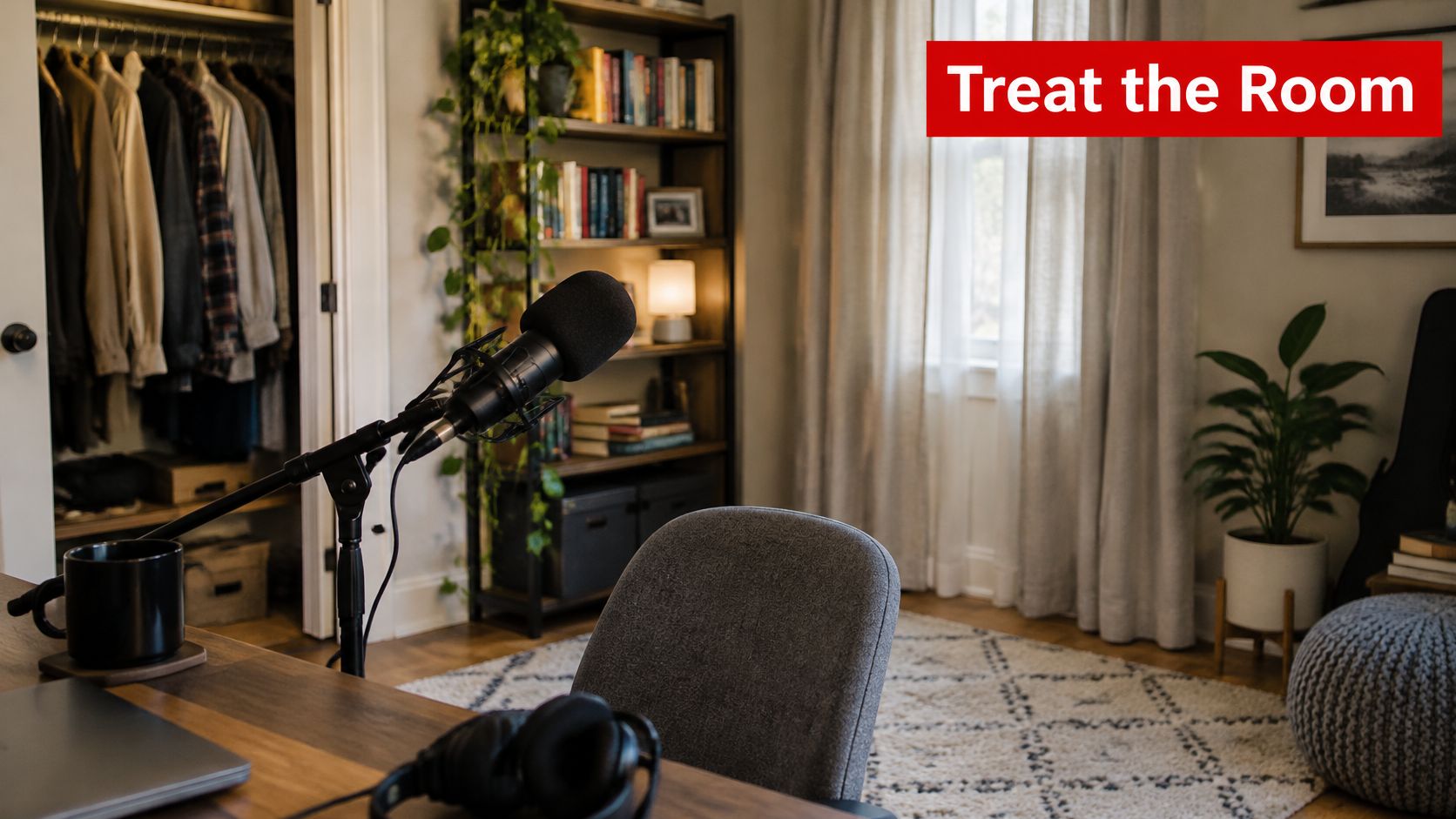
This setup illustrates the practical relationship between microphone placement, headphones and the recording space.
Choose the space by listening
Clap sharply where the speaker will sit. A fluttering or metallic tail means you should change the position or add absorption before recording; listen particularly for reflections between parallel bare surfaces.
A clothes-filled closet can work better than a bare office, provided it isn't cramped enough to create an unpleasant enclosed tone. Thick curtains and upholstered furniture help with reflections; a rug addresses a hard floor, while a bookshelf mainly breaks up reflective surfaces rather than replacing broadband absorption.
Remove steady noise: Turn off nearby fans and silence notifications. Move a noisy computer away from the microphone rather than planning to erase it later.
Treat the reflection path: Put absorption where speech bounces back toward the mic, not wherever a panel looks attractive.
Check the furniture: Tap the desk and move the microphone stand. If the recording captures thumps, isolate the stand or change its position.
Use this home podcast studio setup guide to plan the physical arrangement before buying more processing software.
Establish repeatable microphone technique
For a directional dynamic microphone, begin close enough to get a direct voice without exaggerated bass or breath blasts. Speak slightly across the capsule, place a pop filter between mouth and mic, and keep the distance steady when turning toward a guest.
Set input gain while the speaker delivers an enthusiastic sentence and laughs. Leave visible headroom below clipping; a comfortable speaking passage isn't a sufficient level test. Distortion recorded at the input can't be undone by lowering the fader afterward.
Use closed-back headphones to prevent playback leaking into the microphone. For remote interviews, request a local recording and a backup, then check the guest's actual microphone selection rather than trusting the device name shown in the call.
Before recording: Capture a short stretch of room tone and a sample answer. Listen for hum, hiss, echo, plosives and headphone leakage before committing to the conversation.
How to Clean and Edit Speech Step by Step
Cleanup should remove distractions without removing the speaker's rhythm. Work on individual tracks, with the original recordings safely preserved.
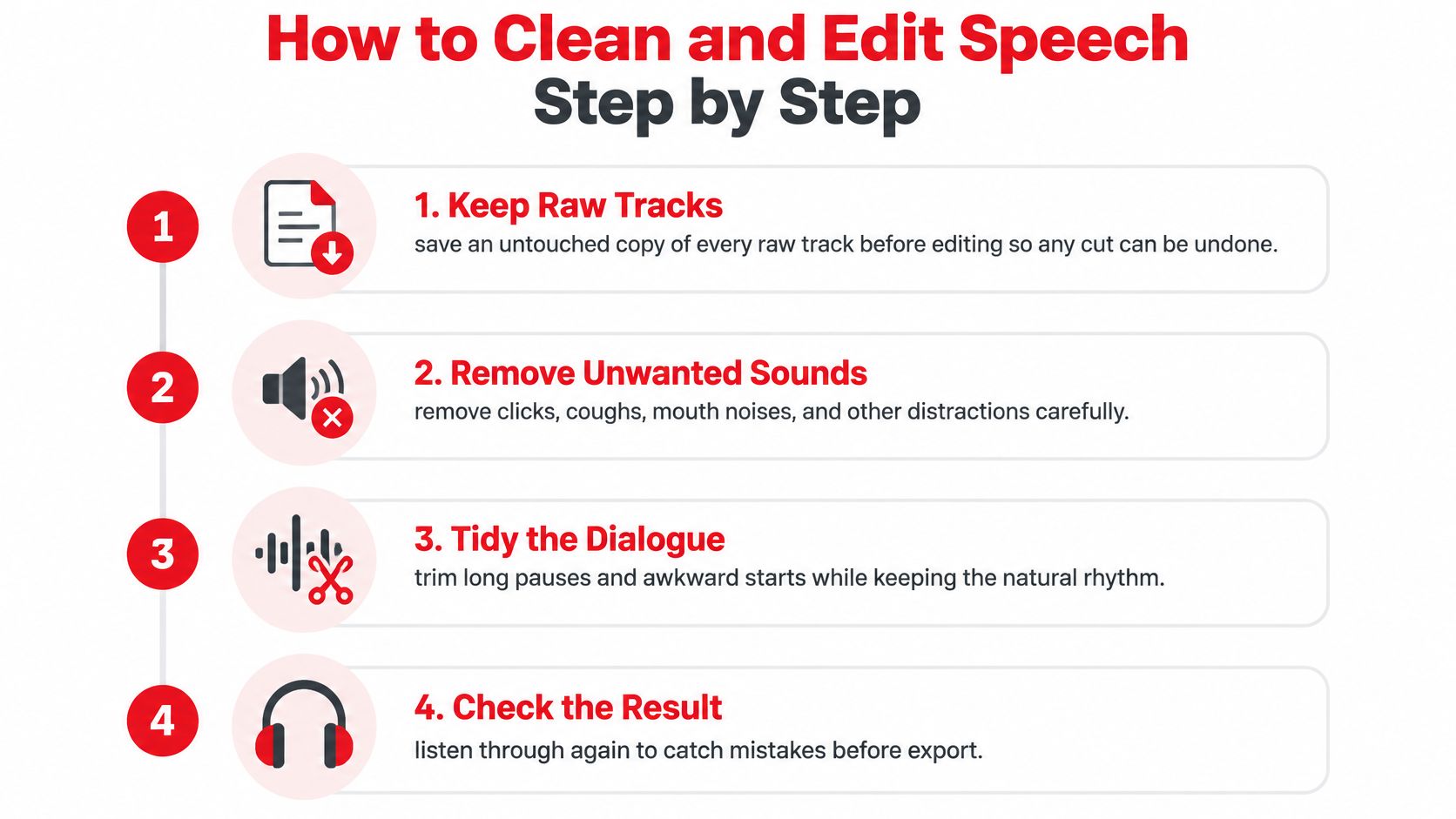
Keep this editing sequence beside the session as a reminder to review the result, not just execute cuts.
Edit for continuity
Preserve the raw tracks. Duplicate the session or keep untouched source files outside the working edit. Use nondestructive edits so a word boundary or interrupted breath can be restored without rebuilding the conversation.
Remove clicks, coughs, accidental interruptions and abandoned starts where they distract from meaning. Shorten dead air by listening to the exchange, not by forcing every pause to the same duration; hesitation can communicate uncertainty or emphasis.
Reduce steady noise selectively. If your denoiser uses a noise profile, capture room tone without speech and increase reduction only until the distraction recedes. Listen for watery vowels, metallic tails and softened consonants, which tell you the processing is damaging speech.
Lower intrusive breaths with clip gain rather than deleting every inhalation. Keep enough breath to support natural phrasing, especially before an emphatic answer.
Fade edit boundaries. Add short crossfades where cuts expose waveform discontinuities, and extend them if you hear ticks. Don't overlap unrelated syllables so far that words smear together.
Balance speakers with clip gain before compression, then address unusually quiet or loud phrases individually. Similar-looking peaks are only a starting reference; compare the actual voices at a fixed listening level.
Use automation as an assistant
In Alitu's 2025 survey of 558 independent creators, 33% of video podcasters reported using AI-assisted editing tools, compared with 24% of audio-only podcasters. That describes adoption, not permission to approve an automated edit without listening.
Transcript-based editors can accelerate selection and assembly, but audition the join before and after each removed passage. Watch for clipped word endings, missing responses and changes in meaning when an apparent filler word carries agreement or hesitation.
The editing demonstration below offers another way to inspect the process.
Finish with a continuous listen rather than checking only highlighted edits. Cleanup is complete when the conversation flows naturally, background changes don't draw attention, and you can follow each speaker without noticing the repair work.
Don't chase absolute silence between words. Abruptly switching from room ambience to digital silence can make an otherwise clean edit more conspicuous.
EQ and Compression Settings for Speech
Tool | Starting setting | What to listen for |
|---|---|---|
High-pass filter | Raise the cutoff until rumble recedes, then back off before thinning speech | Handling noise gone, voice still full |
Mud cut | Use a broad, shallow cut where the voice sounds boxy | Less room coloration without a hollow voice |
Presence boost | Apply a gentle boost only if consonants need help | Clearer articulation without harshness |
De-esser | Target the speaker's strongest sibilant band | Hissing S sounds controlled, no lisp |
Compressor ratio | Start with gentle compression | More stable delivery without flattened emphasis |
Compressor threshold | Lower until loud phrases are restrained | Quiet words remain audible, no pumping |
Attack and release | Preserve word attacks and recover between phrases | Consonants intact, recovery sounds natural |
Limiter ceiling | Use the chosen destination's true-peak ceiling | Encoded output passes the peak check |
Correct tone before controlling dynamics
Use a high-pass filter, corrective EQ, de-esser and compressor in that order as a starting chain. Removing unnecessary low-frequency energy before compression helps prevent plosives or desk vibration from driving gain reduction across the whole voice.
Adjust the filter while listening to a full sentence, not a silent section. If the speaker loses weight or sounds telephone-like, you've removed useful voice energy along with the rumble.
For muddiness, sweep an EQ band to locate the objectionable area, then make a restrained cut. Don't keep the exaggerated sweep setting, and don't assume different speakers need the same correction.
Brightness isn't the same as intelligibility. A high-frequency boost can make a voice seem impressive in isolation while making S sounds abrasive during a full episode. Try reducing competing music or correcting low-mid buildup before adding more top end.
Compress delivery, not personality
Set the compressor while alternating between an ordinary sentence and an animated answer. Adjust the threshold so louder phrases receive meaningful control while quieter phrases retain movement.
A fast attack can dull the leading edge of words. A release that recovers too abruptly can make breaths and room tone surge; one that holds too long can pull down the next sentence.
Compare processed and bypassed speech at similar apparent volume. If the processed version wins only because it's louder, you haven't established that it's better.
Use manual gain changes for a guest who repeatedly turns away from the mic. Heavy compression across the entire track is a poor substitute for correcting isolated level drops.
Keep music beneath the dialogue, and reduce competing frequencies in the music before carving away the speaker's tone. Check the passage with the densest arrangement and the quietest spoken line together, not just the opening bar of the bed.
Bypass the chain periodically and listen for clearer words, stable tone and intact expression. If processing adds work for the listener, remove or soften the stage responsible.
Loudness Targets and How to Measure Them
Waveform height doesn't tell you how loud an episode feels. A brief laugh can produce the highest peak while the surrounding interview remains difficult to hear.
Integrated LUFS describes perceived loudness across the programme rather than the height of an individual peak. Descript's podcast loudness guide describes approximately -16 LUFS for stereo speech, approximately -19 LUFS for mono speech, a practical -1 dBTP ceiling, and Spotify guidance that has cited -14 LUFS.
Destination | Integrated loudness | True-peak ceiling | Notes |
|---|---|---|---|
Stereo spoken-word master | -16 LUFS | -1 dBTP | Widely used stereo target |
Mono speech production | About -19 LUFS | -1 dBTP | Common mono speech practice |
Apple Podcasts | Follow Apple's documented LKFS target and tolerance | Follow Apple's pre-encoding specification | Confirm the delivered file separately |
Spotify guidance | -14 LUFS | Use a codec-safe production ceiling; confirm current platform requirements | Cited guidance, not a universal podcast target |
EBU R128 reference | -23 LUFS | -1 dBTP | Broadcast reference, not the default podcast target |
EBU R 128 specifies a -23.0 LUFS programme reference, a ±1.0 LU production tolerance in practical cases, ±0.2 LU measurement tolerance for quality control, and a maximum true peak of -1 dBTP. Its measurement framework is useful for understanding loudness control, but adopting that framework doesn't mean every podcast should use its broadcast reference level.
Measure the entire programme
Render the complete episode with the intro, music, ads and ending included. Use a loudness meter compliant with the relevant ITU-R BS.1770 measurement method and EBU Tech 3341, and reset it before measuring a new render.
Read integrated loudness: Compare the complete programme against your documented release target.
Inspect short-term behaviour: Look at speaker handoffs, music entrances and advertising transitions.
Review loudness range: Investigate large changes by listening; don't flatten them automatically.
Adjust and render again: Change overall gain only after the internal balance works, then verify limiting and peaks.
An integrated reading can hide a locally uncomfortable passage. Say a quiet interview occupies most of an episode while a brief inserted ad is much louder: the programme average alone won't identify the listener's abrupt volume change.
Separate balance from final level
If a guest remains difficult to follow while the host sounds comfortable, return to the guest's gain and dynamics. Raising the master makes both louder and leaves their relationship unchanged.
Likewise, don't force a loudness target by making the limiter work continuously. Listen for blunted consonants, strained laughter and a voice that no longer relaxes between phrases.
Choose a documented target that suits your delivery destination and apply it consistently across the series. The useful result is an episode listeners can follow without repeatedly touching the volume control, not the highest reading your processor can produce.
Export Settings and a Final Listening Check
A passing master isn't a finished deliverable. Encoding can change peaks, and a balanced studio mix can still reveal masking or harshness on ordinary playback equipment.
Apple's official audio requirements recommend approximately -16 dB LKFS within ±1 dB, with true peaks no higher than -1 dB FS, calculated under ITU-R BS.1770-5 before encoding. Treat that as a pre-encoding specification, then verify what the export contains.
Setting | Starting value | Check after export |
|---|---|---|
Sample rate | Preserve the master's sample rate unless delivery requires conversion | Export matches the intended rate |
Encoding | Use the host's accepted MP3 or AAC delivery preset | Re-measure and audition the encoded file |
Integrated loudness | Documented destination target | Within the chosen tolerance |
True peak | Destination ceiling with sufficient encoding headroom | Encoded file remains within the ceiling |
Listening devices | Earbuds, phone, laptop, car | Voices, ads and intro remain balanced |
Inspect the encoded file
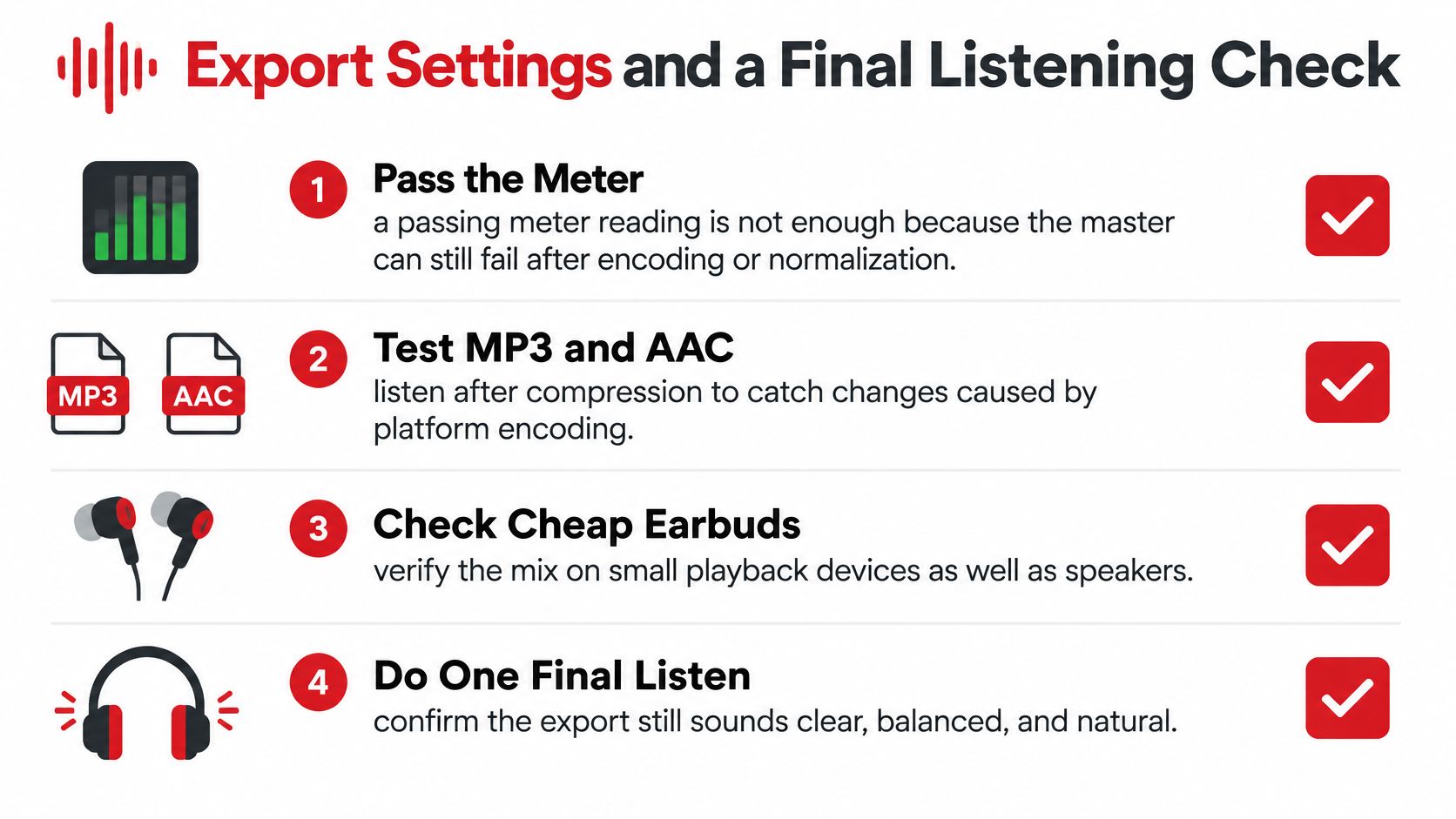
Import the actual delivery file into a fresh session or measurement tool. Check its complete loudness reading and maximum true peak rather than assuming the export inherited every property of the master.
If encoding pushes peaks beyond the ceiling, lower the limiter output or provide more headroom, then encode again. Turning down an already distorted export won't undo the distortion.
Use this checklist when approving the deliverable.
Give each device a specific job
Earbuds: Check sibilance, edit clicks and whether the ad bed obscures the host.
Phone speaker: Play at low volume and confirm that word endings remain understandable.
Laptop speakers: Compare the intro with the interview without changing playback volume.
Car: Listen while safely parked, then assess road-noise masking only when someone else can handle playback.
Listen through the complete export to catch missing audio, a truncated ending or an accidental mute. Compare difficult passages against the less-processed mix at matched volume before signing off.
Release criterion: Approve the file you're uploading, not the session that produced it.
Check Accessibility for Music, Stingers and Ads
Accessibility belongs in mastering because speech isn't always the only carrier of meaning. A transcript can preserve dialogue while omitting an ominous soundscape, an archival recording's context or a musical transition.
A scholarly discussion of sonic elements in transcription identifies that limitation: written words don't necessarily preserve songs, harmony, atmosphere and other soundscapes. Make a separate accessibility pass after approving the encoded audio.
Preserve meaning across formats
Describe meaningful non-speech audio. Label an archival clip, scene-setting ambience or consequential stinger with a concise description. Decorative background music doesn't need an elaborate account, but a sound that changes the story does.
Correct automated transcripts manually, including names and specialist terminology. Use a consistent podcast transcript format so speaker changes and meaningful sound descriptions are easy to distinguish.
Test reduced-audibility playback. Lower the volume and use the accessibility settings your audience may rely on. Check whether dialogue remains understandable without the listener having to infer missing consonants.
Audition host-read ads and inserted spots at their edit boundaries. Check both the spoken level and any sudden musical entrance.
Keep useful context. Aggressive denoising can remove environmental cues that explain where a scene takes place. Reduce distracting noise without making the setting unintelligible.
Judge the result by comprehension, not silence. A listener reading the transcript or hearing only part of the mix should still understand who is speaking, what changed and why the sound matters.
Decide Whether to Master In-House or Outsource
Keep mastering in-house when a trained person can own the complete process, the recording format is stable and quality checks fit the publishing schedule. Count cleanup, revisions, export testing and transcript review as production work, not incidental tasks.
Outsource when remote recordings repeatedly need repair, advertising transitions require close supervision or unfinished episodes accumulate. Compare the recurring workload with the team's available attention rather than judging the decision by episode duration alone.
Define the handoff before delegating
For a separate look at the final processing stage, Vocuno's resource on how to polish your tracks with audio mastering can help you frame the work. Keep dialogue repair and music balancing explicit in the brief instead of assuming mastering includes every upstream correction.
Our podcast editing services sit within a production process covering concept development, recording, editing, publishing and distribution, so the host can focus on hosting and content.
Put these questions into any production brief:
Delivery target: Which loudness target and true-peak ceiling will govern acceptance?
Encoded testing: Will the actual deliverable be checked on phones and in a car?
Transition ownership: Who approves the joins between editorial audio and advertising?
Send the workflow checklist with a representative raw recording and the intended distribution destinations. Require a sample encoded deliverable before approving the recurring workflow, so everyone evaluates the same audible result.
Podmuse designs, produces and manages audio and video podcasts, from concept development and recording through editing, publishing and distribution. Visit Podmuse to discuss your show's production needs, and bring a recent episode plus your delivery checklist to make the conversation specific.
Comments