
Podcast Marketing Automation: A Practical Guide for 2026

You publish on Tuesday, chase a sponsor by email on Wednesday, and spend Friday rebuilding the same download report from three dashboards that don't agree. Nothing's broken exactly. It's just manual, and every new episode or ad flight adds another handoff someone can forget.
That's the point where podcast marketing automation stops being a nice idea. You're not buying software to feel modern. You're building repeatable systems so publishing, distribution, promotion, and measurement happen the same way every time, with data you can confidently defend.
Table of Contents
What Podcast Marketing Automation Means - Automation Is More Than Scheduling
The Five Workflows Automation Covers - Publishing and Distribution Come First - Repurposing Needs an Approval Gate - Ad Campaigns and Targeting Carry the Money
Integrations and Platforms Your Stack Needs - Pick One Source of Truth - Connect the CRM Without Breaking It
Building the Workflow in 90 Days - Prove Paid Delivery Before You Scale It
KPIs That Show Delivery and Results - Filter Before You Compare - Every KPI Needs an Owner and a Threshold
Measuring Incremental Impact Without Overclaiming - Build a Layered Workflow - Privacy Limits What You Should Automate
What Podcast Marketing Automation Means
Say a small team runs a branded show. One person books a host-read sponsorship over email, another pastes download numbers into a spreadsheet, and a third rebuilds the monthly report by hand because last month's file used different episode names. The work gets done, but it can't scale and it can't be audited.
Podcast marketing automation means rule-based systems that publish, distribute, repurpose, buy, and measure podcast content and ads with minimal manual handoffs. Humans keep strategy, guest choices, creative judgment, and budget decisions. The system handles the repeatable parts.
Think of it as autopilot, not the pilot. Autopilot holds altitude and course once you've set the flight plan. It doesn't choose the destination, and you don't switch it on before you know where you're going.
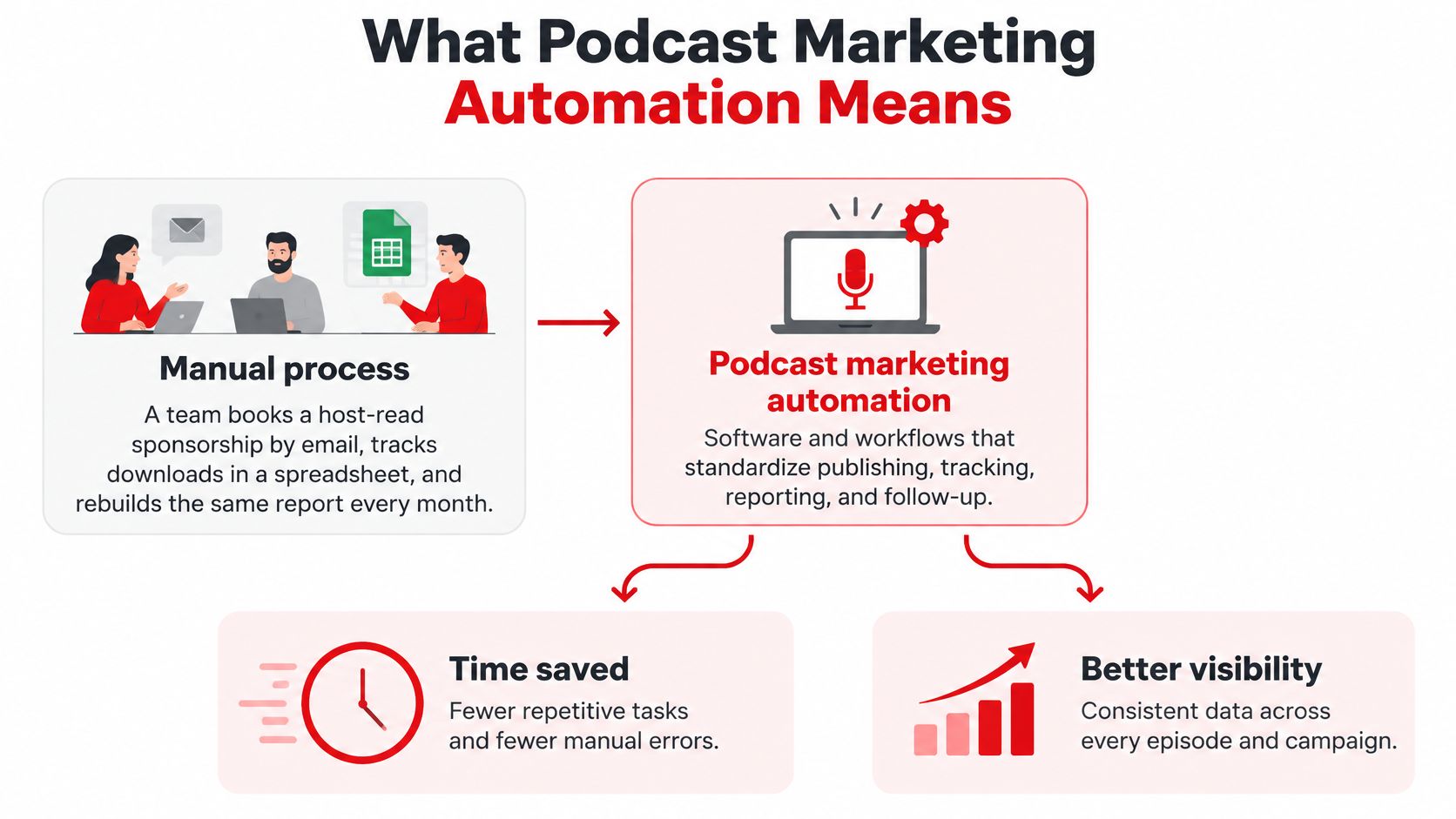
Automation Is More Than Scheduling
Scheduling posts an episode at a set time. Automation moves data and decisions between systems. A published episode can trigger transcript creation, clip drafts, show notes updates, and the start of a paid flight, all tied to the same episode ID.
The scale justifies that effort. According to Inside Radio's report on the Interactive Advertising Bureau and PwC figures, U.S. podcast advertising revenue grew 26.4% in 2024 to more than $2.4 billion. A large, recurring audience makes standardized targeting, frequency control, and reporting worth building properly.
Automation pays off when you have three conditions.
Regular publishing cadence: Episodes ship often enough that templates and triggers save real hours.
Multiple ad buys: Flights, caps, and creative rotation need rules, not inbox memory.
Reporting across teams: Marketing, sales, and finance need the same numbers from the same source.
If you're releasing one-off episodes with no paid support, I'd wait. Get the show consistent first.
The Five Workflows Automation Covers
Automation earns its keep when every workflow produces an output you can verify. These five run in order, and each ends with a check, because a workflow nobody checks is just faster guesswork.
Workflow | Inputs it needs | What gets automated | Output to check |
|---|---|---|---|
Publishing | Edited audio, episode metadata template, publish date | Feed update, metadata fill, scheduled release, feed validation | Episode live on schedule with valid feed |
Distribution | Live RSS feed, show artwork, video files | Directory submissions, YouTube uploads, show notes sync | Episode listed on each platform |
Repurposing | Transcript, approved clip rules, brand templates | Timestamped clips, quote graphics, short-form cuts | Approved clips and quote graphics posted on schedule |
Ad campaign automation | Media plan, creative files, budget, flight dates | Flight setup, creative trafficking, pacing, pause rules | Delivered impressions match the plan |
Audience targeting | Segment definitions, show lists, exclusions | Segment rules, daypart settings, frequency caps | Reach and frequency within agreed limits |
Publishing and Distribution Come First
Publishing automation ingests the edited file, fills metadata from a template, schedules the feed update, and validates the RSS feed before release. The check is simple. Did the episode go live on time with correct titles, artwork, and enclosure URLs?
Distribution automation pushes that feed to directories and video platforms and syncs show notes everywhere. The same trigger that confirms an episode is live can also fire podcast email marketing alerts to subscribers, so the audience hears about the release while it's fresh.
Repurposing Needs an Approval Gate
Repurposing turns one episode into timestamped clips, quote graphics, and short-form video cut from the transcript. Automate the drafts, not the judgment. Keep a human approval step, because a clip that's technically correct can still be off brand or taken out of context.
Automate draft creation aggressively. Automate final approval never.
Ad Campaigns and Targeting Carry the Money
Ad campaign automation builds flights from a media plan, traffics creative to ad slots, watches pacing, and pauses delivery when budgets or frequency caps are hit. Dynamic ad insertion is now the dominant way podcast ads get delivered, so pacing rules, caps, and makegood logic can all run automatically. The catch is that the delivery report you get back is the ad server's version of events. Reconcile delivered impressions against your own media plan records, not just the platform dashboard, or your reporting will only ever confirm what the seller wants to claim.
Audience targeting automation applies segments, dayparts, and show-level exclusions. Rules built on audience overlays drift, and a segment defined six months ago may no longer match who is listening. The targeting dashboard won't flag that for you. Review segment definitions and exclusion lists on a schedule, or you'll keep optimizing toward an audience definition nobody still believes in.
Integrations and Platforms Your Stack Needs
Most automation failures aren't tool failures. They're handoff failures. The host calls it Episode 42, the ad server uses a different ID, and the CRM campaign name matches neither. Every report after that is guesswork.
Layer | Example platforms | Data handed off | Needed when |
|---|---|---|---|
Hosting and feed | Megaphone, Acast, Transistor, Buzzsprout | RSS feed, episode metadata, enclosure URLs | Always |
Directory distribution | Apple Podcasts Connect, Spotify for Creators, YouTube Studio | Feed validation, show and episode IDs, video uploads | Always |
Ad serving and marketplaces | Dynamic ad insertion, ad networks, programmatic marketplaces | Ad slot IDs, placement records, delivery logs | Paid campaigns run |
Warehouse and log storage | BigQuery, Snowflake | Raw download and impression logs | Measurement beyond platform dashboards |
CRM | HubSpot, Salesforce | Campaign IDs, lead and opportunity stages | B2B pipeline is tracked |
Clip and repurposing | Descript, Riverside | Transcripts, timestamps, exported clips | Repurposing is automated |
Orchestration | Zapier, Make, Airflow | Triggers and field mappings between tools | Native links are missing |
Pick One Source of Truth
Your hosting platform should own episode IDs and enclosure URLs. Directories validate and display, they don't define your catalog. Ad servers own placement and delivery records. If two systems both claim to be authoritative for the same field, you'll spend meetings reconciling instead of optimizing.
A warehouse like BigQuery or Snowflake becomes necessary once you want raw download and impression logs, because platform dashboards rarely expose them. That's where filtered delivery numbers should come from, not from screenshots.
Connect the CRM Without Breaking It
The CRM should receive campaign IDs and stage changes, not a flood of raw listening events. If you're mapping those flows, it's worth learning how to build reliable CRM automation workflows before you connect podcast triggers to lead records. Choosing each layer deliberately matters too, and a clear-eyed look at what a podcast marketing tool should actually handle helps you avoid buying overlap.
Orchestration tools like Zapier, Make, or Airflow for larger teams are glue. Use native integrations where they exist, since custom glue is another thing that breaks at 2 a.m
Before you connect anything, confirm every tool can carry the same three identifiers.
Show ID: One stable value for the program across host, directories, and reports.
Episode ID: One stable value per episode, never the title alone.
Campaign ID: One stable value per flight, shared by ad server, landing pages, and CRM.
Building the Workflow in 90 Days
Don't try to automate everything in one sprint. Build in six phases over 12 weeks, and don't start the next phase until the current check passes. That discipline is the whole project.
The timeline below shows the sequence and the gate at each stage.
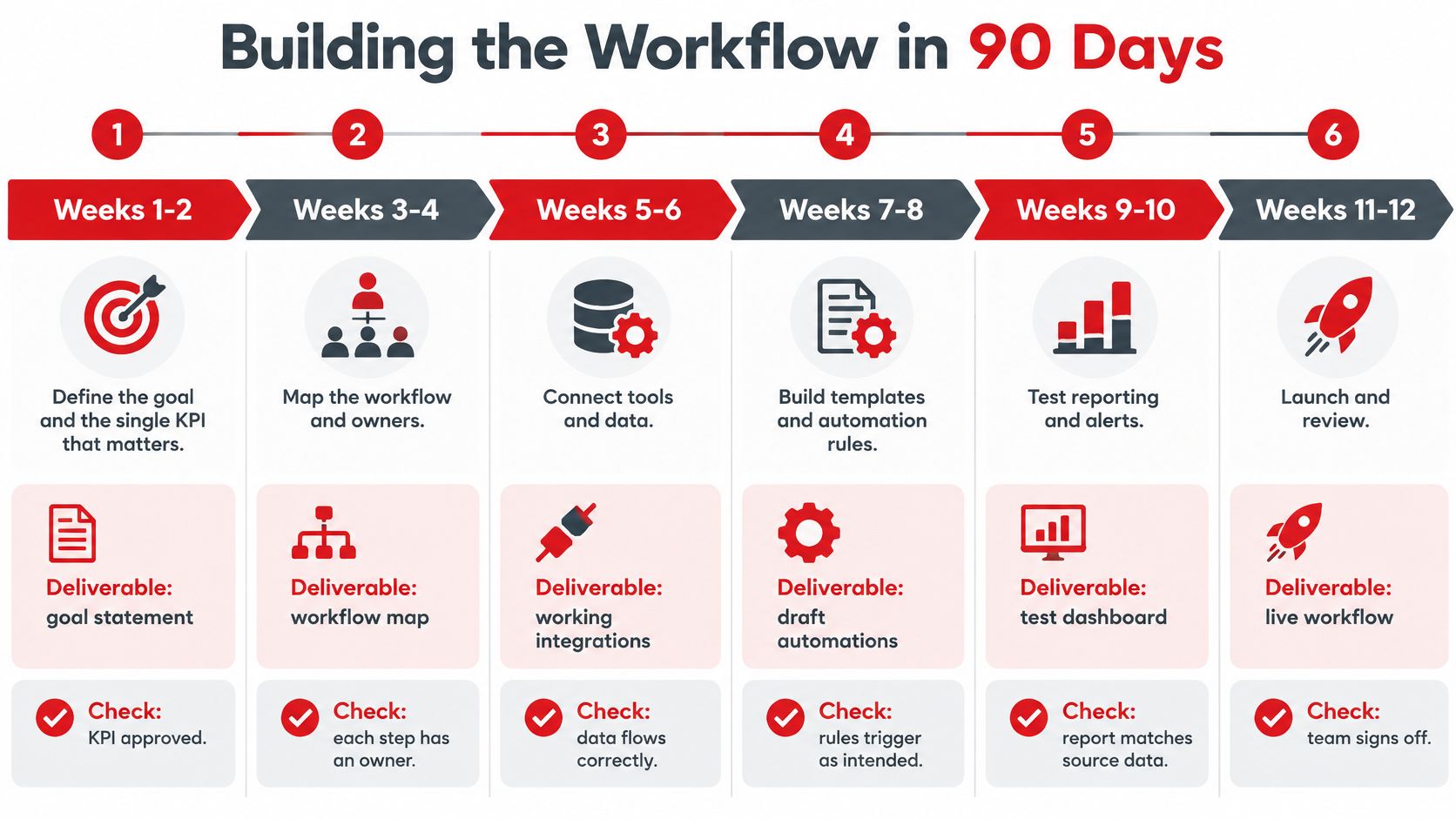
Weeks 1-2, define the goal: Pick the single KPI that proves success and name an owner for each workflow. Deliverable, a signed-off goal statement and owner list. Check, the KPI and owners are approved in writing, not assumed.
Weeks 3-4, map identifiers: Choose the hosting platform as the source of truth for episode IDs and enclosure URLs, and agree naming rules for shows, episodes, and campaigns. Check, every tool in the stack can reference the same three IDs without translation tables.
Weeks 5-6, connect publishing and distribution: Validate the feed and run one test episode end to end, from edited file to live listings. Check, the test episode appears on each platform with valid metadata and correct show notes.
Weeks 7-8, set up repurposing: Build clip and graphic templates and put the approval step in writing, since client or brand review is the usual bottleneck. Check, one episode produces approved clips without anyone reformatting files by hand.
Prove Paid Delivery Before You Scale It
Weeks 9-10, traffic one ad flight: Run a single real flight through the stack, compare delivery with the plan, and confirm pause rules fire when caps are hit. Check that delivered impressions match the plan within the tolerance you agreed before launch.
Weeks 11-12, turn on reporting: Start warehouse ingestion, build one dashboard, and hold a review that decides what to automate next. Check, the dashboard reconciles with hosting and ad-server logs, line by line, for the test flight.
If you want a walkthrough of how these phases fit together in practice, the video below is a useful companion while you map your own sequence.
Three slips cause most failed builds. Teams connect ad delivery before identifiers are consistent, so spend can't be traced. They automate repurposing before brand rules are written, so reviewers reject everything. And they skip the test episode, then discover feed problems on launch day with a sponsor watching.
Gate rule: No phase is done because the tool is connected. It's done because the check passed on real output.
KPIs That Show Delivery and Results
One listen number can't serve every purpose. A producer needs delivery data, a media buyer needs pacing, and a revenue leader needs pipeline. Split KPIs into four groups and give each group its own source and review rhythm.
KPI | What it measures | Source | Review cadence |
|---|---|---|---|
Filtered unique downloads | Listens after bot filtering and deduplication | Hosting logs | Weekly |
Delivered impressions vs plan | Ad slots filled compared with the media plan | Ad-server logs | Per flight |
Reach and frequency | Unique listeners and average exposures | Ad-server and audience data | Per flight |
Completion-rate proxy | Share of listeners reaching a set point in the episode | Host analytics | Monthly |
Subscriber or follower growth | New subscriptions across platforms | Directory dashboards | Monthly |
Vanity URL and promo code use | Direct response actions tied to a campaign ID | Web analytics and checkout | Per flight |
Branded search lift | Change in brand searches during and after a flight | Search console | Monthly |
Qualified pipeline and revenue | Opportunities and revenue linked to podcast touches | CRM | Quarterly |
Filter Before You Compare
Raw download counts are not a KPI. They're an input. The IAB Tech Lab podcast measurement framework recommends a five-stage pipeline that applies filtering logic to remove invalid traffic, applies file-threshold logic, identifies and aggregates unique requests, generates standardized metrics, and audits the process through a feedback loop.
That sequence matters because bots, partial file requests, and duplicate downloads inflate reach and frequency. Inflate delivery and your effective CPM looks better than it is, which corrupts every optimization decision downstream. Calculate cost metrics only on filtered delivery.
Treat download and ad-delivery data as a server-log problem. Your workflow should record episode, enclosure URL, timestamp, user-agent, campaign, placement, and delivery status for every event. Platform-reported plays are a useful cross-check, not the system of record.
Every KPI Needs an Owner and a Threshold
A number nobody owns is decoration. Pair each KPI with a named owner and a threshold agreed before launch, such as a pacing gap against plan that triggers a same-week review. Thresholds turn dashboards into decisions. Without them, teams stare at charts and argue about whether a dip matters.
Keep the groups separate in reporting too. Delivery KPIs tell you whether the system ran. Engagement KPIs tell you whether people stayed. Response KPIs tell you who acted identifiably. Business KPIs tell you whether any of it was worth paying for. Collapsing those into one blended score hides exactly the problem you need to find.
Measuring Incremental Impact Without Overclaiming
A conversion matched to a listener doesn't prove the podcast caused it. That's the trap, and automated dashboards make it worse because they present matched conversions with the confidence of proven causality.
Each evidence layer answers a different question. Delivery data shows whether an ad was served. Direct-response tools like promo codes and vanity URLs capture identifiable actions. Surveys and search trends indicate broader awareness. If you're deciding how to optimize marketing spend with ROI tracking across channels, you'll get further by keeping those layers distinct than by forcing them into one attribution number.
Build a Layered Workflow
Assign every placement a campaign ID, landing-page variant, offer code, and flight window. Ingest conversion events into your warehouse, deduplicate them against paid social, search, and sales outreach, then report direct response and lift-adjusted results side by side. Choosing the right structure for that logic is its own decision, and it helps to think through your podcast attribution model before the first flight runs.
For causal evidence, use geographic holdouts, pre-agreed lift studies, or exposed versus unexposed comparisons. Promo codes undercount because listeners search later, switch devices, or forget the code. Holdouts are slower and less tidy, but they're the only way to estimate what wouldn't have happened anyway.
Report what each method can actually prove, and label the rest as estimate.
Privacy Limits What You Should Automate
IP addresses, timestamps, and user agents can count as personal information when they're reasonably linkable to a consumer or household. So keep delivery measurement, listener behavior, and advertiser outcomes in separate systems. Minimize raw identifiers, document why you keep each field and for how long, and show confidence ranges whenever exposure-to-conversion matching is probabilistic.
Before any flight launches, confirm three things.
Holdout defined: The control group or geo split is agreed before delivery starts, not invented during reporting.
Identifiers minimized: Only fields with a documented purpose flow between systems.
Uncertainty stated: Every report says plainly which results are direct, which are modeled, and which are lift estimates.
I would rather show a smaller number I can defend than a larger one that collapses under one hard question from finance.
B2B and Consumer Brand Examples
The right automation mix depends on how the brand makes money. These two composite examples are illustrative, not client results, but they show how priorities shift with the sales cycle.
Say a B2B software company runs an interview show for buyers. Its priority workflows are publishing, distribution, and repurposing, because clips feed LinkedIn and give sales reps something useful to send. Paid activity stays narrow, with targeted host-read placements in relevant business shows. Nobody expects pipeline the week an episode drops.
A consumer wellness brand looks different. It runs a short daily show and buys reach at scale, so ad campaign automation and audience targeting do the heavy lifting. Performance is judged per flight on delivered impressions, promo code use, and cost per acquisition, because the purchase decision is fast.
The planning work behind both models starts the same way, with people deciding what each episode and flight is for.

Brand type | Priority workflows | Primary KPIs | Ad mix | Review rhythm |
|---|---|---|---|---|
B2B software | Publishing, distribution, repurposing | Branded search lift, qualified pipeline | Targeted host-read placements | Quarterly |
Consumer wellness | Ad campaign automation, audience targeting | Delivered impressions, promo code use, cost per acquisition | Programmatic and dynamic insertion | Per flight |
The shared lesson is ordering. Both teams set the KPI before building the automation, and both let the sales cycle decide how quickly results get judged. A quarterly pipeline review would starve the wellness brand of feedback. A per-flight revenue verdict would kill the B2B show before its audience compounds.
Start With One Workflow This Quarter
Automate the workflow where a missed step costs you the most. For a new show, that's usually publishing and distribution. For a brand already buying placements, it's ad campaign automation, because pacing and cap errors cost money directly.
Run three checks before you start.
KPI with a named owner: One metric, one person accountable for acting on it.
Shared ID scheme: Show, episode, and campaign IDs agreed across every tool involved.
One end-to-end test: A single episode or flight run through the full workflow before you scale it.
Then do the one-week exercise. List every manual handoff your team performs in a week, rank them by hours lost, and automate the top item first. It's unglamorous, and it works better than any maturity model.
On build options, be honest about capacity. An in-house stack gives you full control over IDs and data, but it needs engineering time you may not have. An outside partner can shorten setup considerably. For example, our AI-Powered Podcast Media Plan delivers relevant podcasts and YouTube channels for an ad campaign as a full media plan within 24 hours, and our growth services cover distribution, paid promotion, and content repurposing across major platforms. Judge any option, internal or external, against the same three checks above.
Answer one question this week. Which handoff, if automated, would free the most hours for your team?
If you'd rather not build and maintain every workflow yourself, Podmuse can plan and run the system with you, from media planning and ad buying to production, distribution, and repurposing. Tell us whether you need publishing consistency, paid reach, or defensible reporting first, and we'll recommend the one workflow to automate this quarter.

Comments