
Podcast Cover Art Design: A Step-by-Step Guide for 2026

You've finished a cover that looks polished on your laptop, but it shrinks into an unreadable square in a podcast app. The title competes with a host photo, a logo, and a tagline, and nobody can agree whether to simplify it. That's the practical test of podcast cover art design: not whether the artwork looks impressive full size, but whether someone can recognize the show at thumbnail size.
Start with one 3,000 × 3,000-pixel master, then judge the design through a blinded recognition test at 60 to 160 pixels. Platform compliance gets the file accepted. Clear hierarchy, contrast, and recognition make it work once it's there.
Table of Contents
Platform Specs That Set Your Canvas Size
Platform | Dimensions | File type | Color | Main risk |
|---|---|---|---|---|
Apple Podcasts, RSS submission | 1,400 × 1,400 to 3,000 × 3,000 px, 3,000 preferred | JPG or PNG | RGB, no alpha | Blurry, pixelated, or misaligned artwork can be rejected |
Apple Show Cover template | 3,000 × 3,000 px | PNG or JPG | Solid background, no alpha | Using a smaller master and upscaling it |
Spotify | 640 to 10,000 px per side, 1:1 ratio | TIFF, PNG, or JPG | sRGB, 24 bits per pixel | No upscaling; embedded color profiles and orientation metadata aren't supported |
Recommended master file | 3,000 × 3,000 px | PNG | sRGB, flattened | Designing small and scaling up later |
The practical rule is to build one square 3,000 × 3,000 master and export platform-ready files from it. Apple accepts RSS artwork between 1,400 × 1,400 and 3,000 × 3,000 pixels, with the largest size preferred. Its Show Cover template specifies a 3,000 × 3,000 image with a solid background and no transparency. See Apple's Show Cover artwork specifications.
Spotify has a wider technical range, from 640 to 10,000 pixels per side, but still requires a square image. Its file guidance specifies sRGB, 24 bits per pixel, and TIFF, PNG, or JPG, with no upscaling. Spotify's practical target is in the same range as Apple's, so a large square master is the straightforward shared starting point.
The square format matters because the artwork can appear in search results, recommendation feeds, mobile libraries, connected-TV interfaces, and social previews. One rectangular export or an important detail placed too close to an edge can create inconsistent crops across those settings. A square canvas lets platforms reduce the same image without having to make a new crop.
In 2026, Slice Media reported that the median cover-art size among 1,000 top podcasts was 3,000 × 3,000 pixels, a sign that this has become a common market baseline as well as a practical production size (Slice Media's 2026 cover-art data). For platform-specific delivery, use Spotify's cover-art requirements and check how Spotify podcast distribution fits into your publishing workflow.
Two errors catch new designers repeatedly: creating the artwork at 1,400 pixels, then stretching it to a larger size, and exporting a rectangle that fails Spotify's square requirement. Start large, keep the canvas square, and let each platform scale down from a clean master.
Build and Export the Master File
A master file is useful only if the design holds together after it's reduced and exported. Work through the design and production decisions in order, keeping the source file separate from the final upload versions.
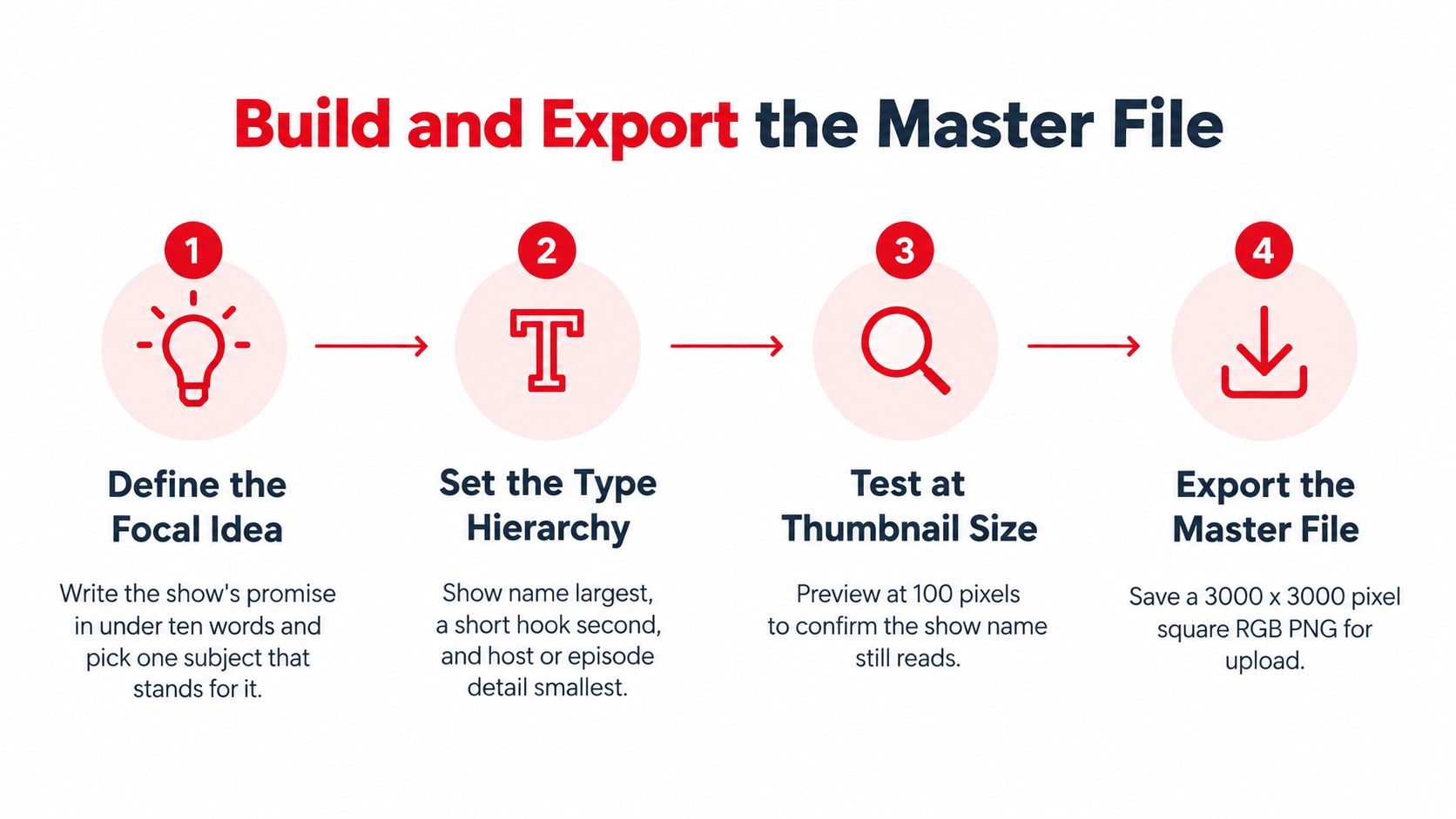
Set one focal idea. Write the show's promise in fewer than ten words, then choose one subject that communicates it. A cover trying to represent the host, the company, the topic, and the season at once usually has no clear first impression. A small source image won't become sharp by stretching it, so use artwork created for the master canvas.
Build a simple type hierarchy. Make the show name the dominant text, add a short hook only if it helps, and keep the host name or episode detail secondary. Two or three levels are enough to guide the eye. If every line looks equally important, none of them reads first.
Set a safe zone. Keep critical words and faces away from the outer edges and lower corners, where rounded masks or interface overlays may intrude. At full size, an edge can seem like convenient space for a long title. At thumbnail size, that placement can make the title feel cramped or clipped.
Create the real square master. Build at 3,000 × 3,000 pixels in RGB and confirm the canvas is exactly square. A near-square image can be rejected or rendered inconsistently, and enlarging a small source softens its edges. For Apple's Show Cover, use PNG or JPG on a solid background without an alpha channel.
Prepare the export deliberately. Convert to sRGB, flatten the layers, and remove orientation metadata and embedded profiles before delivery. Spotify doesn't support embedded color profiles or orientation metadata, so don't rely on either to make the file display correctly. Check that the subject and text are already positioned and oriented properly in the image itself.
Inspect more than the large view. Review the artwork at full size, as a thumbnail at approximately 64 to 160 pixels wide, and in grayscale. Apple's artwork guidance advises reducing visual elements and warns that blurry, pixelated, misaligned, or poor-quality art can be rejected (Apple's artwork guide). Grayscale reveals colors that look different by hue but merge into the same visual value.
Export and test platform files. Make the appropriate PNG or JPG file for Apple's Show Cover, and a supported, square TIFF, PNG, or JPG for Spotify. Don't upscale any platform version. Then inspect the actual files in directory listings, search results, mobile players, and social previews. Keep the master and export settings together so future episode artwork starts from the same system.
Rights belong in the production checklist too. Confirm that you're allowed to use the photographs, trademarks, and likenesses in the design, and don't include Apple logos, products, or related marks. Technical acceptance is the floor. Recognition, not a crowded pile of information, is the standard to aim for. The listener recognition process comes later; first, make sure the exported file is genuinely ready to test.
Typography and Color That Survive a Thumbnail
A show called Operations Unfiltered sits among competitors in a crowded podcast app. On a laptop, you can read the title, see the host, and notice the company logo. At 100 pixels, the title needs to carry the design; small supporting details may disappear.

Use one heavy sans-serif face for the title, and add no more than one supporting typeface. Thin serifs, scripts, and light font weights tend to lose their shape when reduced. Keep the title concise, and remove any subtitle that turns into a row of indistinct marks at thumbnail size.
Color needs to do more than express brand personality. Set 4.5:1 text-to-background contrast as a working floor, and check the contrast at the actual scale where someone will see the cover. That ratio is a design target here, not a platform specification. Prefer strong light-dark differences over two similar hues, because two different colors can still have nearly the same visual value.
Here's a contrast example: a B2B interview show could use navy and white, with one accent color to separate its show mark from the background. A fitness series might use yellow type on black for a more forceful look. Both choices provide a clear light-dark relationship; neither needs several hues competing for attention.
A red-green pairing can fail for people who can't easily distinguish those colors. Don't make the title, subject, or key graphic depend on that difference alone. Check the artwork in grayscale and with a color-vision simulation, and make sure important shapes still separate through their lightness and darkness.
Apple advises reducing visual elements because artwork appears alongside other shows. That's a useful correction when a team wants to include every brand asset at once. One strong color and one type family usually beat three of each.
Composition and Brand Consistency Across Episodes
A cover can meet every file requirement and still feel cluttered. Start the composition with one place for the eye to land, then give that subject enough space to remain recognizable when reduced. Negative space isn't wasted room. It separates the subject from the title and keeps the image from reading as a block of competing shapes.
Think of the design as two layers. The show-level layer stays stable: the show mark, type choices, color tokens, and the placement of the host or primary subject. The episode layer changes only when the episode needs it, such as a guest name, an episode number, or a single theme image.
For example, an executive interview show could keep the host or guest portrait in the left third and place its logo on a navy band. Each episode swaps in a different guest photo and one brief topic line. The familiar arrangement gives returning listeners a stable visual cue, while the changing photo signals that the episode has new content.
The trap is treating brand consistency as a reason to repeat every element on every cover. If the show mark, company logo, host bio, guest title, topic line, and tagline all stay in the template, consistency just reproduces clutter. A leaner show-level identity with restrained episode variations is easier to recognize and easier to maintain.
Before choosing a visual system, define what the podcast is and how each episode works. Podmuse helps clients define their podcast concept, format, episode structure, and content strategy so the show aligns with their brand and goals. A written concept makes it easier to decide what belongs on the cover and what should stay in the episode description. Teams planning the show's presence across video platforms can also consider how the cover relates to a podcast YouTube channel.
Common Mistakes That Get Covers Rejected or Ignored
Most cover problems are preventable. Some require a rebuild from the master, while others can be fixed by changing the export.
Mistake | What it looks like | Fix |
|---|---|---|
Upscaling a small source file | Soft edges and blur on every thumbnail | Rebuild from a 3,000 × 3,000 vector or high-resolution master |
Leaving an alpha channel | Rejection or unexpected black background | Flatten onto a solid background and export without transparency |
Relying on subtle color differences | Title and subject merge in grayscale or dark mode | Use value contrast of dark against light |
Text placed near the edges | Title clipped by rounded corners or app overlays | Keep critical text inside the safe zone |
Unlicensed stock or likenesses | Rights rejection or takedown risk | Use licensed or owned images with signed releases |
Apple logos or related marks | Policy rejection | Remove platform marks and use the show's own identity |
Too much copy | Illegible at 60 to 160 pixels | Keep the title and one visual, move the rest to the description |
The most common branded-show mistake is treating the cover like a miniature brochure. A tagline, URL, host biography, company name, and show title may all make sense in the brand deck. They won't all remain readable in the app. Keep the show title and a clear visual, then put the extra context in the description.
Some fixes call for a design change. If a small image has already been enlarged, adding a sharpening filter won't restore detail that isn't in the source. Return to a high-resolution or vector source and rebuild the cover at its intended size. If text sits near an edge, move it inward in the master rather than hoping every platform will display it the same way.
Other problems are export mistakes. Transparency can be removed by flattening the file on a solid background and exporting without an alpha channel. If a cover relies on similar colors, change the design so the text and subject separate by light and dark value, rather than making an export adjustment that leaves the same contrast problem in place.
Rights issues need a check before upload, not after a platform complaint. Use images you own or have permission to use, confirm rights for likenesses, and avoid Apple marks. A technically valid file can still be unsuitable if the imagery or branding isn't cleared.
Confirm the Cover Passes Before You Publish
Sign-off starts from the single 3,000 x 3,000 master, then drops straight to the sizes people really see: 60, 100, and 160 pixels. I show those exports to reviewers who know nothing about the show and ask one question: what is this podcast about? If the answer misses the premise, the cover fails even when it looks sharp full size.
Run the review blind. No mood board, no episode title, no hint about the host. Record the guessed topic next to the intended one, and keep the wording reviewers use, because those words show whether the focal image and title carry the same idea.
Test | Check | Pass condition |
|---|---|---|
60 px thumbnail | Title readability | Title words identifiable without zooming |
100 px thumbnail | Subject separation | Subject outline visible against the background |
160 px thumbnail | Secondary text | Secondary text is readable, or removed |
Grayscale view | Value contrast | Title and subject remain distinct without color |
Color-vision simulation | Hue-only cues | Title and subject separate by value, not red or green |
Dark interface | Edge clearance | Title survives with bottom corners covered |
Blinded recognition | Topic guess | Most reviewers name the show's topic correctly |
At 60 pixels, only the title needs to survive. At 100, the subject has to separate from the background by outline and value. At 160, secondary copy earns its place or gets cut; shrinking a weak line again just creates a cleaner failure.
Then test color and interface conditions. Grayscale should still separate title from subject. A color-vision check catches red-green cues that vanish for some listeners. On a dark app background, cover the lower corners and see whether the layout still holds when interface elements sit on top of the art.
Set fail conditions before anyone argues taste. Unreadable title at 60 pixels: shorten it or redraw the lettering. Wrong topic guesses: change the focal subject rather than the explanation. Secondary text lost at 160: delete it. Keep a pre-publish podcast launch checklist beside the art file so exports, upload, and release copy get reviewed in the same pass.
Episode variants need the same gate. A new guest photo, brighter set, or seasonal badge can break the contrast that made the template work. Log each result in a shared sheet: size export, grayscale view, dark interface check, blind topic guess, and the change made after a fail.
Publish when the required checks pass. For branded shows that need strategy and production around that decision, Podmuse covers concept development, content strategy, and full audio and video production. Bring the master file and premise to Podmuse when the show is ready to be built.
Comments